Roblox Redeem Codes

  1. 9 The Most Common Roblox Code Errors and How to Fix Them

    Even when players find working Roblox redeem codes, many still face frustrating issues — invalid code warnings, expired messages, or redemption glitches. These problems can make it seem like Roblox codes never work, when in reality, most errors come from small mistakes or misunderstandings about how the system functions.

    In this section, you’ll learn exactly what causes these Roblox code errors, how to fix them instantly, and how to make sure every Roblox promo code or game-specific code you find is redeemed successfully without problems.


    Why Roblox Code Errors Happen

    Every Roblox code is verified through the platform’s secure servers. When you enter a code, Roblox checks:

    • Whether the code is real and officially issued.

    • Whether it’s still active (not expired).

    • Whether it’s already been used by your account.

    • Whether it applies to your region or game.

    If any of these conditions fail, you’ll receive an error message. The good news is that most errors can be easily fixed — if you know what they mean.


    The Top Roblox Code Error Messages and Their Meanings

    Here’s a breakdown of the most common error messages players encounter when redeeming codes and how to solve each one.


    1. “Code Already Redeemed”

    What It Means:
    You’ve already used this promo or game code on your account. Roblox codes can only be redeemed once per account — even if they remain active.

    How to Fix It:

    • Double-check your inventory; the reward is probably already there.

    • Try logging into another Roblox account (if you have multiple) — but remember, never share or trade codes.

    • Keep a small note file listing every code you’ve already redeemed to avoid duplicates in the future.

    Pro Tip:
    Some codes can appear “used” if you attempted redemption before Roblox’s servers fully processed your request. Wait a few minutes and refresh before retrying.


    2. “Code Expired”

    What It Means:
    The promo code was valid but has now expired. Roblox codes often have expiration dates linked to specific events or promotions.

    How to Fix It:

    • Check if Roblox has reissued the same code under a new name (e.g., AMAZONFRIEND2022 might be replaced by AMAZONFRIEND2023).

    • Follow Roblox’s official blog or social channels for reactivated codes.

    • Redeem new codes as soon as possible; many expire within days of release.

    Example:
    The ROBLOXEDU2021 code worked during a limited educational event — now expired, but occasionally reappears during Roblox classroom campaigns.


    3. “Invalid Code”

    What It Means:
    This message appears when Roblox doesn’t recognize the code you entered — meaning it’s either fake, mistyped, or unofficial.

    How to Fix It:

    • Copy and paste the code directly from a verified source (codes are case-sensitive).

    • Avoid codes found on random YouTube comments or suspicious websites.

    • Make sure you’re redeeming the right type of code — some are in-game codes, not promo codes.

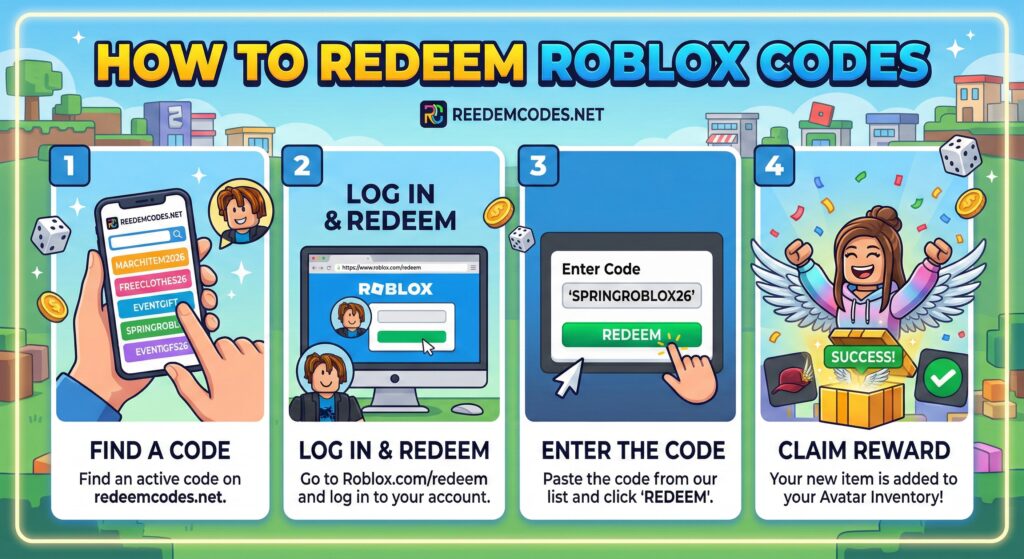
    • Always redeem through https://www.roblox.com/redeem only.

    Pro Tip:
    An “invalid code” doesn’t necessarily mean it never worked — sometimes developers temporarily disable codes during maintenance.


    4. “Code Doesn’t Work for This Account”

    What It Means:
    The code might be region-restricted, event-exclusive, or tied to a specific game or platform (like Xbox-only rewards).

    How to Fix It:

    • Try redeeming the code on another device or account region (for example, using a U.S.-based VPN for region-specific codes).

    • Verify the code’s eligibility details — Roblox sometimes publishes these in event announcements.

    • Use alternative official codes that offer similar items if you’re locked out due to geography.

    Example:
    Some codes like MERCADOLIBREFEDORA2021 were exclusive to Latin America through Mercado Libre promotions.


    5. “Something Went Wrong. Try Again Later.”

    What It Means:
    This is a server-side issue on Roblox’s end — not your fault. It usually happens when thousands of players try redeeming a popular code simultaneously.

    How to Fix It:

    • Wait a few minutes or hours before retrying.

    • Clear your browser cache and cookies.

    • Try redeeming in incognito mode or a different browser.

    • Check Roblox’s status page to confirm if redemption servers are under maintenance.

    Pro Tip:
    If the error persists for more than 24 hours, report the issue to Roblox Support under the “Promo Code Not Working” category.


    6. “You Need to Log In to Redeem This Code”

    What It Means:
    You’re not signed in to a Roblox account when attempting to redeem the code. Roblox codes can only be redeemed when logged into an active user profile.

    How to Fix It:

    • Log into your Roblox account first.

    • If you use multiple accounts, ensure you’re on the intended one.

    • Avoid redeeming codes from shared or public computers unless you log out afterward.

    Pro Tip:
    Never enter promo codes when logged into someone else’s account — even for testing. You’ll lose access to any rewards instantly.


    7. “This Code Is for a Different Platform”

    What It Means:
    Some Roblox codes are released exclusively for a specific platform (like Xbox, Amazon, or event-only).

    How to Fix It:

    • If it’s an Xbox-exclusive code, redeem it via the Roblox Xbox app.

    • For Amazon codes, log in through an Amazon promotion page before redemption.

    • Check the source announcement for platform restrictions.

    Example:
    Codes bundled with Roblox gift cards from Amazon often unlock platform-exclusive avatar items, unavailable to players who purchased from Walmart or GameStop.


    8. “You Have Reached the Maximum Redemption Limit”

    What It Means:
    Some events allow a limited number of redemptions per item or per day. This usually applies to in-game codes that can be used globally only a few thousand times.

    How to Fix It:

    • Look for updated codes released by developers.

    • Follow the official Discord or Twitter for new redemption rounds.

    • Try again after a few hours if the developer resets limits.

    Example:
    In Pet Simulator X, event codes often have global redemption caps that reset with every major update.


    Technical Issues During Roblox Code Redemption

    Sometimes errors aren’t due to the code itself but technical or browser issues. Here’s how to troubleshoot common problems.


    Browser Glitches

    Some browsers block Roblox scripts or fail to update the redemption page correctly.

    Fix:

    • Use Google Chrome or Microsoft Edge for best compatibility.

    • Clear cookies, cache, and temporary files.

    • Disable ad blockers or privacy extensions temporarily.

    • Switch to incognito/private mode for a clean session.


    Mobile App Redemption Errors

    Roblox’s mobile app doesn’t always allow code redemption natively.

    Fix:

    • Open roblox.com/redeem through your mobile browser (not the app).

    • Ensure “desktop site” mode is enabled.

    • Paste the code carefully, as mobile keyboards can autocorrect characters.


    Server Overload or Lag

    When major codes drop (like Blox Fruits anniversary codes), Roblox servers can lag under traffic spikes.

    Fix:

    • Redeem during off-peak hours (early morning or late night).

    • Refresh after five minutes if redemption fails.

    • Join Roblox’s official status page or Discord for announcements about server load.


    Common Mistakes That Cause Roblox Code Errors

    Even experienced players sometimes make these small but costly mistakes that lead to invalid or failed codes:

    1. Using fake or unverified websites to find codes.

    2. Typing errors — missing letters or spaces.

    3. Using expired lists from outdated videos.

    4. Trying to redeem in the wrong place (game code entered on promo site or vice versa).

    5. Logging into the wrong account when redeeming.

    6. Redeeming on mobile apps that don’t support promo functions.

    Always ensure your code source is official or partner-verified before using it.


    How to Avoid Future Roblox Code Errors

    Here are long-term habits to prevent redemption problems permanently:

    • Bookmark Roblox’s official redemption pages.

    • Subscribe to verified code update sites like Pocket Tactics, Pro Game Guides, and Dexerto.

    • Check expiration dates before redeeming.

    • Save redeemed codes in a personal notepad or spreadsheet.

    • Redeem immediately when new codes are released — don’t delay.

    • Follow event announcements from developers to stay updated.

    These steps dramatically reduce error rates and ensure smoother code experiences.


    How Roblox Handles Invalid or Fake Codes

    Roblox’s automated security system scans all entered codes. When a fake or unrecognized code is detected, it is flagged automatically. If a code is being spammed from multiple devices or accounts, Roblox’s anti-bot filters can temporarily lock redemption access for those IP addresses.

    Best Practice:
    Avoid entering random “leaked” codes from YouTube or Discord in bulk. Doing so may trigger temporary security flags.


    What to Do If Your Code Is Valid but Still Fails

    Sometimes, even working codes may fail temporarily due to technical syncing issues between Roblox’s promo database and your account inventory.

    Here’s what to do:

    1. Take a screenshot of the error message.

    2. Check your inventory for the item — it may already have been added silently.

    3. Wait 24 hours and retry.

    4. If it still fails, contact Roblox Support and attach your screenshot.

    Roblox’s customer support usually responds within 48–72 hours for code-related issues.


    When Roblox Revokes or Deletes Promo Rewards

    In rare cases, Roblox removes items obtained through discontinued promo codes, especially if they were tied to expired partnerships. For example, branded items like Gucci virtual accessories may vanish after the collaboration ends.

    This is normal and part of Roblox’s event lifecycle. To preserve your favorite items, screenshot or record your inventory after major redemptions.


    Example Troubleshooting Scenario

    Problem: A player tries to redeem AMAZONFRIEND2022 but gets “Invalid Code.”
    Possible Causes & Fixes:

    • The code may have expired — verify through Roblox’s blog.

    • The player entered it in Pet Simulator X instead of the main promo site.

    • Server temporarily down — try again later.

    • Code mistyped (missing uppercase letters).

    Once corrected and entered through roblox.com/redeem, it works perfectly — proving most “broken codes” are user or platform errors.


    Preventing Scams Disguised as “Error Fixers”

    Some websites claim to “fix invalid Roblox codes” by offering special tools or “code unlockers.” These are 100% fake. Roblox codes can’t be modified or extended once expired.

    If you see any of the following red flags, leave immediately:

    • “Use this app to reactivate expired Roblox codes.”

    • “Enter your username to unlock new Robux.”

    • “Verify with a human test to fix invalid code.”

    These scams attempt to harvest your data or install harmful software. The only place to fix a Roblox code issue is Roblox Support, never a third-party tool.


    Final Thoughts on Roblox Code Errors

    Roblox’s redemption system is simple, but millions of players make tiny mistakes that lead to frustrating “Invalid” or “Expired” messages. The truth is, most code problems have easy fixes — and knowing how to interpret the error messages saves time and confusion.

    By sticking to official Roblox sources, redeeming promptly, and understanding what each error means, you’ll never waste another code again. Stay smart, stay secure, and make every Roblox redeem code count toward unlocking real rewards for your account.